


View Your Plan and Subscription
View Your Plan and Subscription
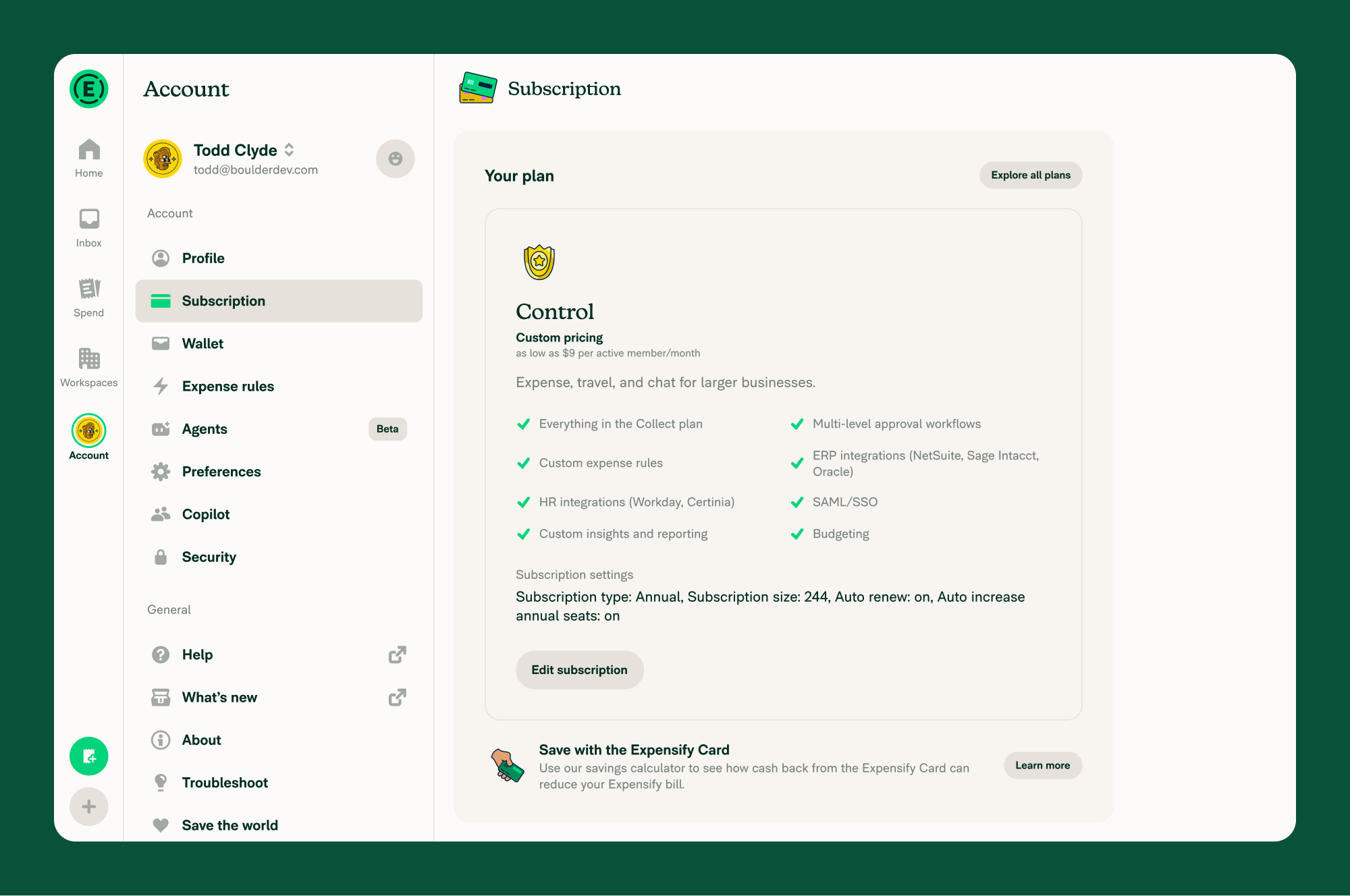
Workspace owners can confirm which plan they’re on— Collect or Control—and the subscription that determines their Expensify bill under Account > Subscription.
Who can view your plan and subscription
Only the Workspace owner can view the Workspace’s plan and subscription together under Account > Subscription.
Workspace Admins can view the Workspace plan under Overview > Plan type, but they can’t view the subscription.
How to view your current plan and subscription
- In the navigation tabs (on the left on web, on the bottom on mobile), go to Account > Subscription.
- Scroll to the Your plan section to view your plan.
- Choose Subscription settings to view your subscription details.
Related articles
- Learn About Plan and Subscription Management
- Change Your Workspace Plan
- Manage Annual Subscription Settings
FAQ
Why is my Control rate shown as a starting price?
Control pricing depends on your subscription type and your organization’s qualifying Expensify Card usage, so it’s displayed as a starting rate per active member. The lowest rate applies when you have an annual subscription and qualifying Expensify Card usage.
To learn more, see Understand Expensify Pricing.
How do I find my Workspace’s owner?
To find the owner of a Workspace you’re a member of, see Learn About Billing Permissions.


